
The simplest DC power option depends on your Starlink kit
“Roam” describes a Starlink service offering, not one universal power connector. A traveller using Mini and a traveller using Standard may need different supplies, cables and router arrangements even when both use Roam.
Updated for October 2026, this guide helps you identify a supported power option before changing an off-grid setup. Direct DC power can avoid using an inverter for Starlink, but the right choice starts with the equipment you actually have.
Start with the terminal, then choose a power path
Record the exact terminal and router models, the battery or portable power source, and any existing adapters. Decide whether the equipment will be used only while parked or whether you also need an approved in-motion arrangement.

Mini with an appropriate USB-C power source
Starlink's Mini USB-C cable guidance specifies a 100W, 20V/5A source for that accessory. A phone charger or power bank carrying a USB-C label is not automatically suitable. Check the required output from the individual port, especially when several devices share a charger.
The cable is intended for Mini, not a Gen 3 router. Its USB-C end should be protected from outdoor exposure. Follow the accessory instructions rather than assuming the weather rating applies equally to both ends.
Standard with a compatible DC supply
Starlink describes DC-input options for compatible Standard kits in its power-supply guidance. Availability and the correct accessory depend on the kit and market. Confirm what is offered for your equipment before buying.
For other terminals or modified systems, obtain a documented configuration rather than treating “Starlink DC” as a universal specification.
What do StarPower products change?
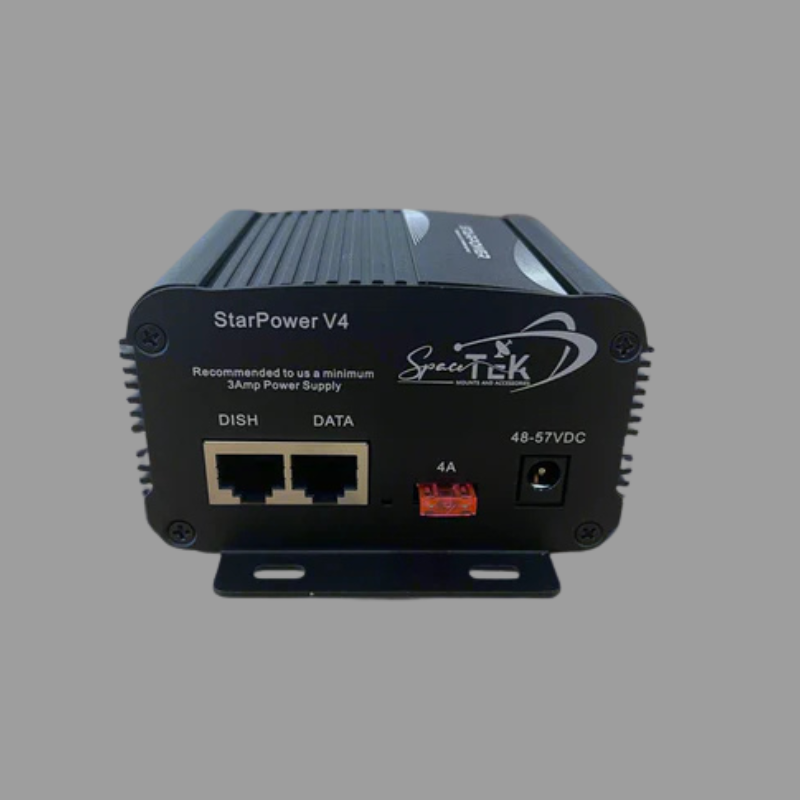
SpaceTek's StarPower V3 is designed to power the original Standard Gen 3 / V4 router from a compatible 12V or 24V installation. It retains that router; it does not remove it. The product needs an indoor or protected location because the unit itself is not moisture-resistant.
Other products in the StarPower range support different arrangements, including router replacement. Confirm the exact terminal, input power, injector, cable and router combination with the supplier.
Do not assume a V2, V3 or V4 product name establishes the same function. In particular, do not connect a nominal 12V battery directly to equipment merely because its description mentions DC. Some arrangements require additional conversion or a specific bundled supply.
Changing the power source and changing the router are separate choices. Avoid adding router replacement to an otherwise suitable travel setup unless it serves a clear need and the selected configuration supports it.
Plan runtime and installation together
An inverter can be convenient if it already powers other equipment. A compatible direct DC option removes that stage from the Starlink power path, but the real energy saving depends on the complete system. It is not a guarantee of longer runtime in every installation.
Compare energy use over similar periods, including any router and other equipment that must remain powered. Consider usable battery capacity and the rest of your travel loads. A converter's maximum output rating is not the dish's average consumption.
For a vehicle installation, have a qualified installer assess the supply, wiring, connections and circuit protection. Follow the instructions for the exact parts. Avoid generic cable-cutting, pinout, fuse or wire-size recipes.
Keep equipment within its stated temperature and environmental limits. Secure and protect cables as documented, including where panels or doors move. Do not improvise live connections or treat an outdoor dish rating as permission to expose an indoor power unit.
Power suitability also does not establish mounting or service eligibility. Check Starlink's in-motion requirements separately before operating while travelling.
Common questions about Roam and DC power
How long will my battery run Starlink?
It depends on usable battery energy, the complete equipment load, other connected devices and conditions. Measure representative use and retain an appropriate reserve rather than relying on a universal hours-per-battery estimate.
Does direct DC mean I should enable router bypass?
No. A power change does not by itself require a networking change. Follow the selected hardware configuration; some supplies deliberately keep the original router.
Can I use any USB-C power bank with Mini?
No. For the official Mini USB-C cable, match the documented 100W, 20V/5A requirement and the cable's instructions. The total advertised output of a multi-port charger may not be available from the port you intend to use.
Will changing the supply fix every dropout?
No. Power problems are only one possible cause. Obstructions, service availability and local Wi-Fi can still interrupt use. If a fault follows an installation change, have that setup checked and retain the app's observations for support.
Is a permanent vehicle installation always necessary?
Not every use case needs the same arrangement. Compare the documented portable accessories with a properly planned vehicle installation. Choose for your actual kit and intended use rather than assuming that hardwiring is automatically the simplest option.
Confirm compatibility before your next trip
Start with one documented configuration and test it before relying on it away from home. Keep the product instructions and a record of what is fitted so you can troubleshoot without guessing which adapter or supply was used.
For SpaceTek accessory advice, contact the team with your terminal, router, battery or portable source, and intended use. Ask for confirmation of any uncertain input or cable requirements before connecting the equipment.

Leave a comment
This site is protected by hCaptcha and the hCaptcha Privacy Policy and Terms of Service apply.