
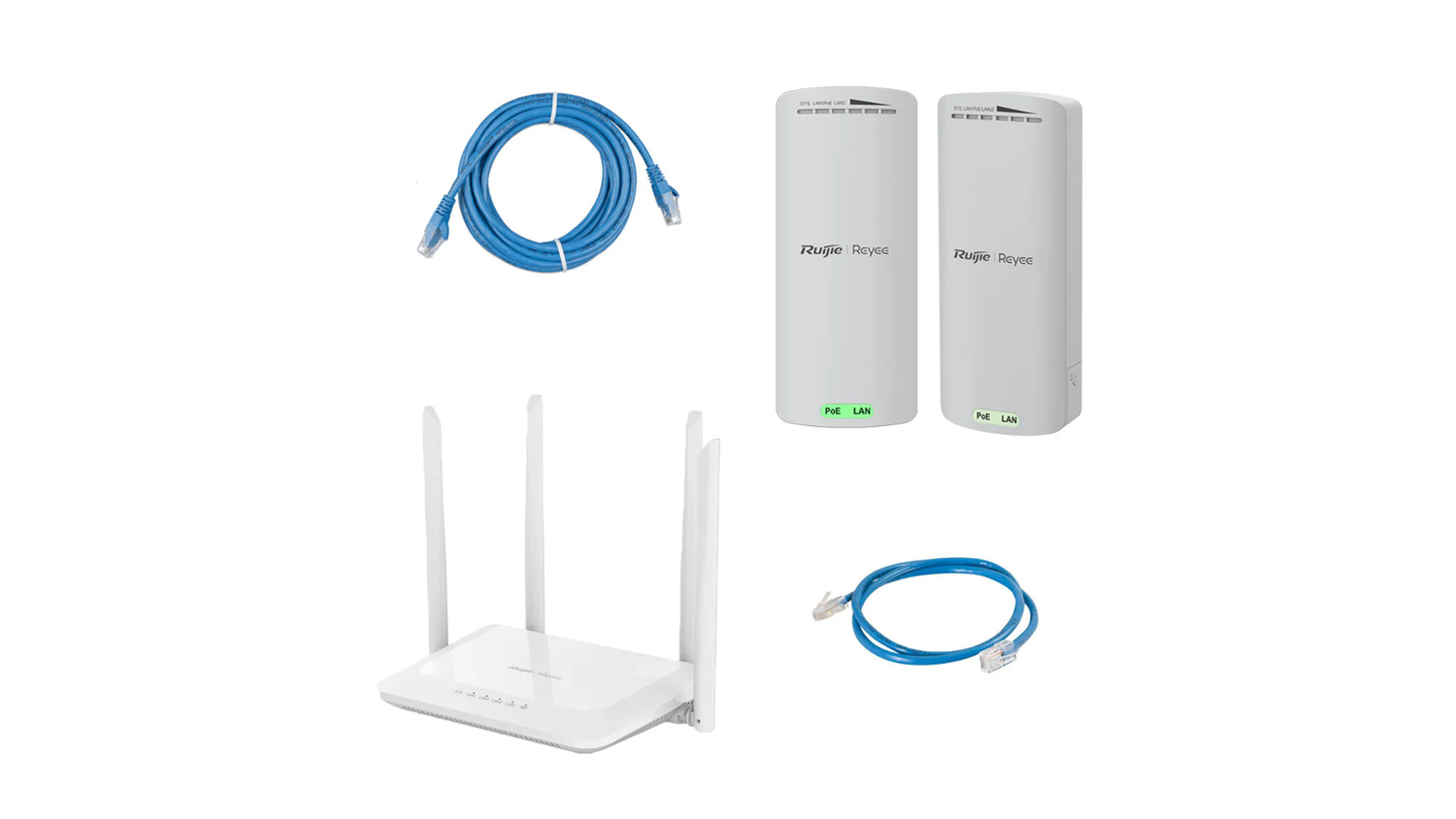
Mesh WiFi works by using a main router connected to your modem alongside multiple satellite nodes placed around your home to create a single, unified wireless network that automatically routes your devices to the strongest signal as you move. This eliminates dead zones and ensures seamless coverage throughout your entire property.
Here is the short answer of how it functions:
- A mesh WiFi system uses multiple nodes (a main router plus one or more satellites) placed around your home
- All nodes share the same network name (SSID) and work together as a single unified network
- Your devices automatically connect to whichever node has the strongest signal as you move around
- If one node goes offline, the network reroutes traffic through the remaining nodes automatically
- The result is seamless, whole-home coverage without dead zones or manual network switching
That's the core of it. No more dropping off a call because you walked from the lounge to the back shed. No more standing near the front door just to get a decent signal.
For anyone living in a large home, a multi-story property, or a rural setup, think a homestead with an outbuilding or a caravan parked away from the main structure, dead zones aren't just annoying. They're a real problem. A single router broadcasting from one corner of the property simply can't reach everywhere, and signal strength drops off fast the further you get from it.
Mesh WiFi was designed specifically to solve that. And since eero launched the first consumer mesh system back in 2014, it's gone from a niche tech product to the go-to solution for reliable whole-home coverage.
What is Mesh WiFi and How Does It Differ From Traditional Routers?
To understand how a mesh network works, it helps to look at what came before it: the humble, traditional single-router setup.
For years, the standard way to get internet in an Australian home was to plug a single router into your modem (or NBN connection box) and hope for the best. This router acts like a single loud speaker sitting in the middle of your living room. If you are standing right next to it, the sound is crystal clear. But walk down the hallway, close a couple of heavy timber doors, or head upstairs, and that sound becomes muffled and hard to hear.
In wireless terms, this is signal degradation. Physical obstacles like brick walls, concrete slabs, timber framing, and even large metal appliances absorb and block the high-frequency radio waves used by your WiFi. The result is a series of frustrating dead zones, places in your own home where your phone drops to one bar of signal or refuses to load a webpage altogether.
According to Google's official documentation on what a mesh network is, a traditional WiFi network relies on a central router to broadcast a signal that weakens the further it travels.
In contrast, a mesh WiFi system replaces this single, central point of failure with a distributed team of smart devices. Instead of one loud speaker in the lounge, a mesh setup is like placing several smaller, perfectly synchronised speakers throughout your entire home. The music is clear, consistent, and perfectly balanced in every room, without needing to blast the volume from a single source.
In 2026, our homes are more connected than ever. With smart TVs streaming 4K video, kids gaming online, and dozens of smart home IoT devices running in the background, a single router simply cannot handle the physical coverage area and device load. A modern mesh network is built to handle these heavy demands, scaling effortlessly to cover anywhere from 2,000 to over 10,000 square feet depending on how many units you deploy.
The Hub-and-Spoke Model vs. The Web Network
The fundamental structural difference between traditional WiFi and mesh WiFi lies in their network topology.
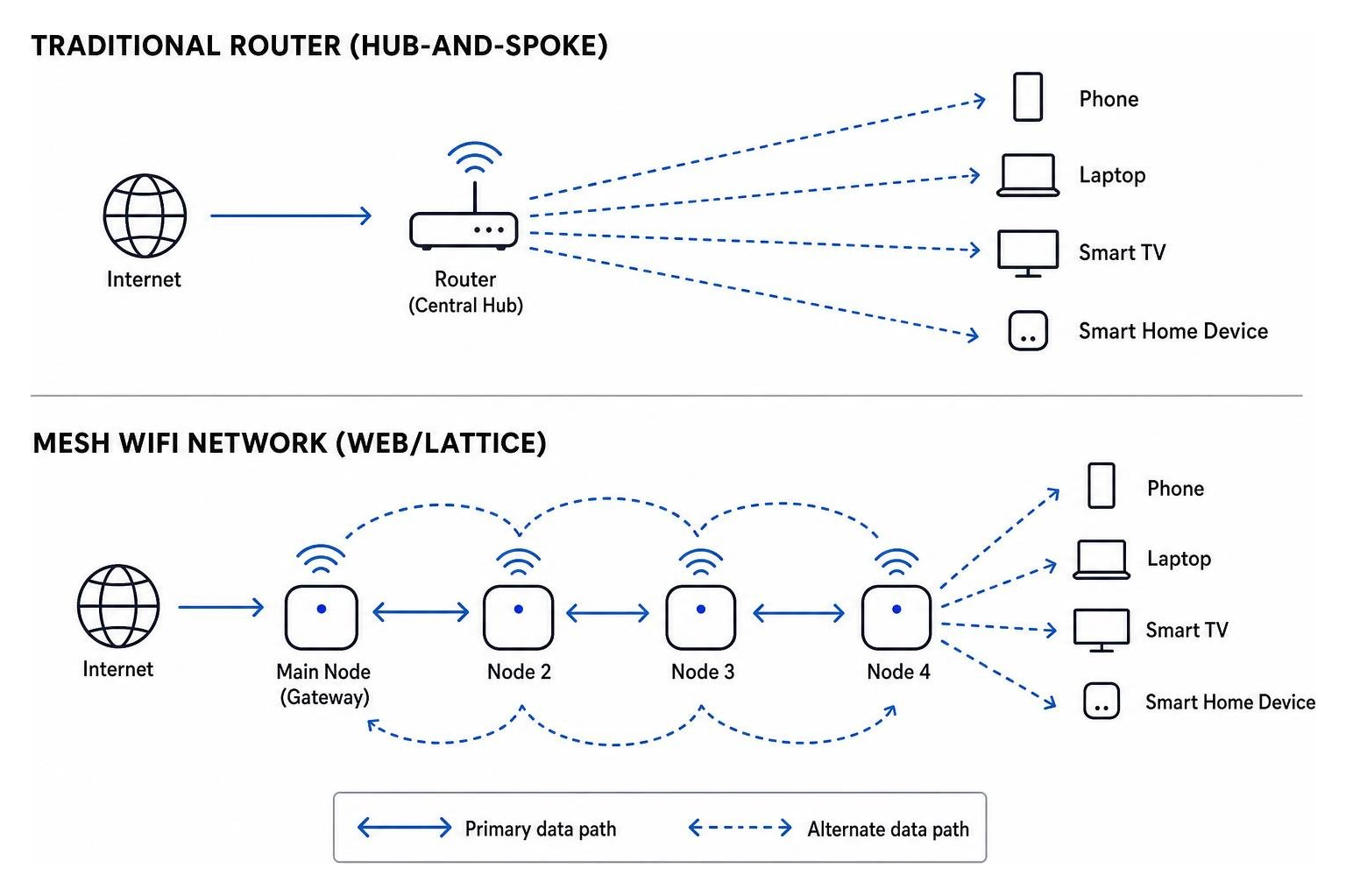
Traditional WiFi operates on what is known as a hub-and-spoke model (or a star topology). In this setup, the central router is the absolute hub. Every single device in your home, your phone, laptop, smart fridge, and tablet, must establish a direct, individual connection back to that central router. If your laptop is in the back bedroom and the router is in the front hallway, your data has to make that long, obstacle-filled journey directly. If the distance is too great, the connection drops.
Mesh WiFi, on the other hand, operates on a web-like network model. While one main node still plugs into your modem to get the internet feed, the other nodes do not need to talk directly back to that central hub. Instead, they can talk to each other.
This is where daisy-chain topology and star topology combine to create an incredibly resilient network. Data can hop from your phone, to the nearest bedroom node, to a hallway node, and finally to the main gateway node. Because the nodes are spaced out, the data travels over multiple short, high-speed hops rather than one long, weak, obstructed leap. This significantly reduces network congestion and prevents your main router from becoming a bottleneck when multiple people are online at the same time.
How Does Mesh WiFi Work to Eliminate Dead Zones?
Now that we know what a mesh network is, let's look at exactly how it gets rid of those annoying black spots.
When you set up a mesh system, you are essentially creating a blanket of wireless coverage over your entire property. Instead of a single device trying to push a signal through three walls and a refrigerator, you place nodes strategically so they can bypass these obstacles. If you want to dive deeper into why this setup is so crucial for modern households, check out our guide on mesh WiFi explained, how it works, and why you need it.
As wireless signals travel through space, they naturally weaken. This signal propagation is heavily impacted by the materials in your home. By placing mesh nodes within a reasonable range of one another (usually covering roughly 2,000 to 10,000 square feet in total across a multi-node system), each node captures a strong, clean signal from its neighbour and rebroadcasts it with full strength. It is a continuous relay race where the baton is passed perfectly every time, ensuring your devices always have a strong local connection.
Understanding Nodes, Satellites, and Seamless Roaming
A standard mesh WiFi system is made up of two main hardware components:
- The Primary Router (Gateway Node): This is the main hub that plugs directly into your internet source (like your NBN box or Starlink router). It handles the heavy lifting of routing traffic, assigning IP addresses, and managing your connection to the wider internet.
- The Satellites (Secondary Nodes): These are the helper units placed around your home. They require nothing but a power outlet. They connect wirelessly (or via Ethernet) to the primary router and to each other, acting as local access points.
The true magic of a mesh system is seamless roaming.
On older networks with range extenders, you had to manually switch your phone's WiFi settings from "HomeWiFi" to "HomeWiFi_EXT" when you walked to the other side of the house. It was clunky, and your phone would often stubbornly cling to a weak, unusable signal from the main router rather than switching to the closer extender.
Mesh networks solve this by using a single, unified network name (SSID) and password across all nodes. They utilise advanced industry standards known as the 802.11k, 802.11v, and 802.11r protocols.
In simple terms, these protocols allow the nodes to constantly talk to each other and monitor your device's signal strength. As you walk from your living room to your backyard, the network actively "hands off" your phone from the lounge node to the patio node. This handoff happens in milliseconds, completely behind the scenes. You can walk around the house on a live Zoom call or stream a high-definition video without a single stutter or drop in connection.
Self-Healing Networks and Dynamic Routing
Another massive advantage of mesh technology is its self-configuring and self-healing capabilities.
In a traditional network, if an access point goes down, you lose connection completely. In a mesh network, the nodes are smart. They use dynamic routing algorithms to constantly calculate the fastest, most efficient path for data to travel.
If a node in your hallway suddenly gets unplugged or loses power, the remaining nodes instantly recognise the failure. Instead of letting the network crash, they automatically reroute your data through another available path.
For example, if the kitchen node goes offline, the bedroom node will instantly stop trying to send data through the kitchen and will instead route it directly to the lounge node. This built-in network redundancy ensures that your internet stays up and running, even when individual pieces of hardware experience issues.
The Role of Backhaul in Mesh Network Performance
When discussing how a mesh network operates, one technical term comes up constantly: backhaul.
Think of your mesh network as a busy shipping port. Your devices (phones, laptops) are small delivery vans bringing goods to local warehouses (the satellite nodes). But those goods still need to be transported from the local warehouses to the main shipping terminal (the gateway router connected to the internet).
The highway used to transport data between the satellite nodes and the main router is the backhaul.
Backhaul is absolutely critical because it determines the overall speed and capacity of your entire network. If your satellites have a weak or slow backhaul connection to the main router, it doesn't matter how close you are standing to the satellite, your internet speeds will be slow.
To maintain high performance, especially with high-speed internet plans, mesh systems use different wireless bands. As detailed in the comprehensive guide on what mesh WiFi is and how it works, having a robust backhaul strategy is what separates premium mesh systems from cheap, slow alternatives.
To solve the backhaul bottleneck, manufacturers developed Tri-Band and Quad-Band technology.
- Dual-Band Mesh: Uses two wireless frequencies (2.4GHz and 5GHz). The nodes must share these same frequencies to talk to your devices and talk to each other. This can lead to a drop in overall speed because the highway is shared.
- Tri-Band Mesh: Adds a second, separate 5GHz (or 6GHz) band. This extra band is completely reserved as a dedicated wireless backhaul. It is a private highway used exclusively for node-to-node communication, leaving the other bands completely free and clear for your phones, TVs, and laptops.
Wired vs. Wireless Backhaul
While wireless backhaul is incredibly convenient because it requires no cabling, you actually have two choices when setting up your mesh system:
- Wireless Backhaul: The nodes communicate with each other using dedicated high-frequency radio bands (like the 5GHz or 6GHz bands in Tri-Band/Wi-Fi 6E/Wi-Fi 7 systems). This is highly flexible and perfect for most rental properties or homes where running cables is difficult.
- Wired (Ethernet) Backhaul: If your home has internal Ethernet wiring, you can plug your satellite nodes directly into the main router using physical Ethernet cables.
Wired backhaul is the gold standard for network performance. It completely eliminates wireless interference and physical obstacles between nodes, providing the absolute lowest latency and unlocking true gigabit-plus speeds across your entire property. If you are a competitive online gamer or have a massive household streaming multiple 4K and 8K videos simultaneously, taking the time to set up a wired Ethernet backhaul is well worth the effort.
Mesh WiFi vs. Range Extenders: What is the Difference?
A common point of confusion is whether to buy a mesh WiFi system or a much cheaper WiFi range extender (sometimes called a repeater). While they both claim to extend your wireless coverage, they do so in completely different ways.
A range extender is essentially a basic listening device. It sits halfway between your main router and your dead zone, grabs the existing WiFi signal, and rebroadcasts it.
However, this comes with several massive drawbacks:
- Severe Bandwidth Loss: Because standard extenders have to use the same wireless radio to both receive and transmit data simultaneously, they instantly cut your available bandwidth in half. The moment your signal passes through an extender, your potential speed drops by up to 50%.
- Separate SSIDs: Extenders usually require you to connect to a separate network name (e.g., "HomeNetworkEXT"). As you move around your house, your phone will stay connected to the weak main router signal until it drops completely, forcing you to manually open your settings and switch to the extender network.
- No Smart Routing: Extenders cannot talk to other extenders. They must each have a direct link back to the main router, meaning you cannot daisy-chain them to reach deep into a large backyard or an isolated outbuilding.
A mesh WiFi system is a total system replacement. It does not just try to boost your old router's tired signal; it replaces your old router entirely with a smart, unified system that manages traffic dynamically.
Why Mesh Systems Outperform Traditional Extenders
Mesh networks are built from the ground up for high-capacity, modern smart homes.
Because they use dedicated backhaul bands and advanced routing protocols, they deliver consistent, full-speed internet to every corner of your home without the 50% speed penalty of traditional extenders.
Furthermore, while a cheap extender might struggle and freeze up when more than five or ten devices connect to it, a quality mesh system is designed to handle up to 200 smart home, gaming, and streaming devices simultaneously. The system's internal software constantly balances the load, shifting bandwidth-heavy tasks to the optimal frequency bands to keep everything running smoothly.
For Starlink satellite internet users looking to maximise their coverage, understanding these differences is crucial. You can read more about how to scale your satellite connection in our article on maximising coverage with Starlink Gen 3 mesh extenders.
Setting Up Your Mesh Network and Optimising Node Placement
Setting up a modern mesh network is incredibly straightforward. The days of logging into a confusing, text-heavy web browser portal on a computer are gone.
Most modern mesh systems are managed entirely through a user-friendly mobile app on your phone. The general setup process follows these simple steps:
- Unpack and Power Down: Unplug your existing modem or NBN connection box from the wall.
- Connect the Primary Node: Use the provided Ethernet cable to connect the internet port of your primary mesh node to your modem's LAN port.
- Power Up: Plug both your modem and your primary mesh node back into the power outlet and wait for them to boot up.
- App Configuration: Open the manufacturer's mobile app on your phone. The app will use Bluetooth to automatically detect the primary node and guide you through setting up your new single network name (SSID) and password.
- Add Satellite Nodes: The app will then prompt you to add your secondary nodes one by one, helping you test their connection strength to ensure they are placed correctly.
A quick tip for those with existing ISP-provided equipment: If your internet provider supplied you with a combined modem-router unit, you should log into its settings and turn off its built-in WiFi, or put the unit into bridge mode (sometimes called bypass mode). This prevents "double-NAT" issues, which can cause routing confusion and slow down your connection when both your old router and your new mesh system try to direct traffic at the same time.
Best Practices for Placing Your Mesh Nodes
Where you place your nodes is just as important as the hardware you buy. If you place a satellite node directly inside a known dead zone, it will simply capture a weak, unusable signal and rebroadcast that weak signal to your devices.
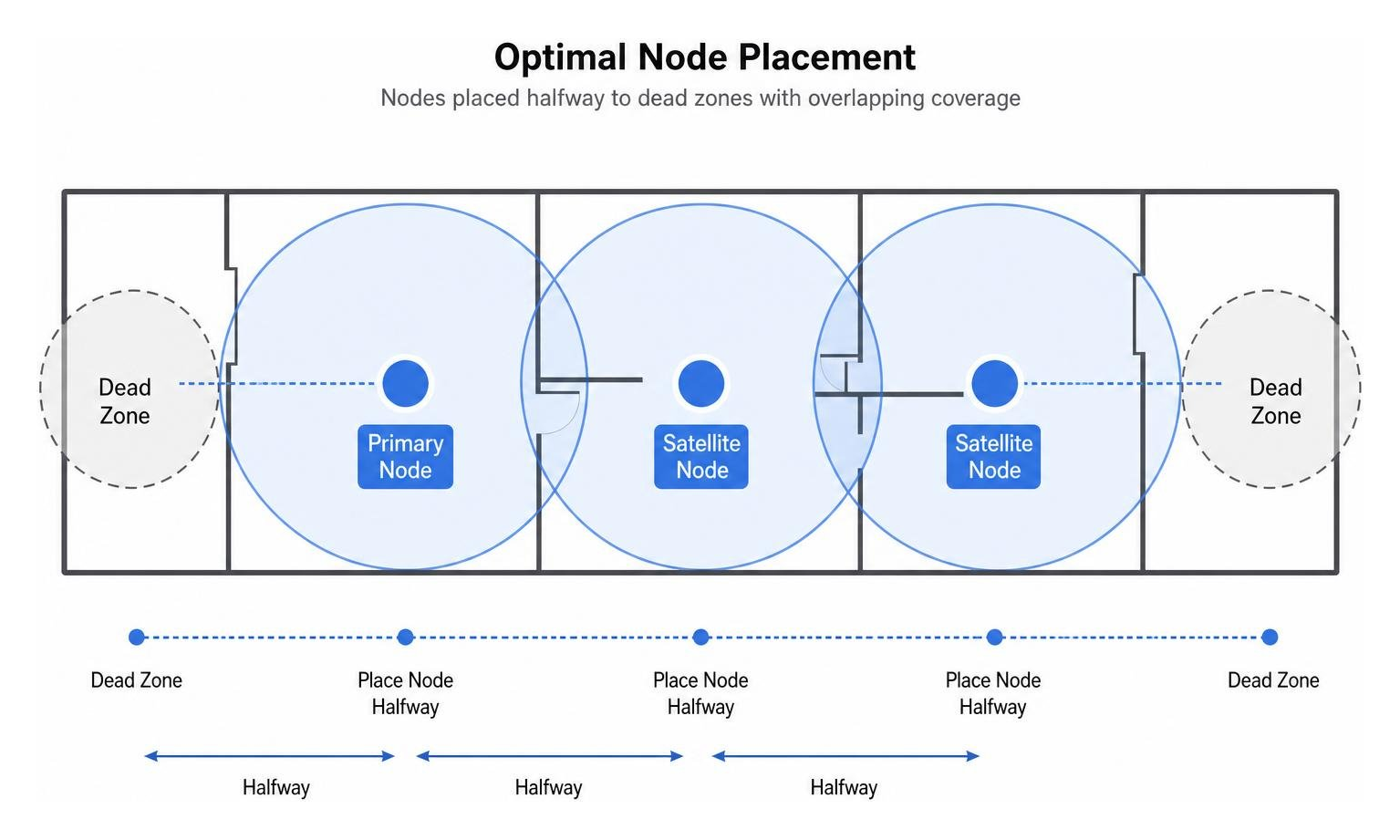
To get the most out of your system, follow these placement best practices:
- The Halfway Rule: Place your satellite nodes roughly halfway between your primary gateway router and the dead zone you want to cover. This ensures the satellite still has a strong, high-speed connection to the main hub.
- Keep Distance Reasonable: Aim for a node-to-node distance of roughly 10 to 15 metres. If you place them too far apart, the backhaul link will weaken, causing speeds to drop. For a detailed breakdown of range limits, take a look at how far Starlink mesh range can reach.
- Maintain Line-of-Sight: Try to position nodes in open areas rather than hiding them away in closed cupboards, behind metal appliances, or under heavy furniture. WiFi signals behave a lot like sound waves, they travel best when they have a clear, unobstructed path.
- Avoid Dense Obstacles: Keep nodes away from thick concrete walls, brick fireplaces, and large mirrors, as these materials are highly effective at absorbing or reflecting wireless signals.
Is a Mesh Network Right for Your Home or Off-Grid Setup?
While mesh WiFi is an incredible technology, it is not a one-size-fits-all solution.
A mesh system is highly recommended if you fit into any of the following categories:
- You live in a home larger than 2,000 square feet (approx. 185 square metres).
- Your home has multiple stories, an unusual L-shaped layout, or a detached garage/studio that needs internet.
- Your property is built with signal-blocking materials like solid brick, concrete slabs, or foil-backed insulation.
- You have a busy household with dozens of smart home IoT devices, security cameras, and multiple users streaming or gaming at the same time.
However, if you live in a small, single-story apartment or a home under 1,500 square feet, a single high-quality router placed in a central location is usually more than enough. Adding unnecessary mesh nodes in a small space can actually cause wireless interference and degrade your network's performance.
For off-grid adventurers, campers, and caravan owners, setting up a reliable network presents unique challenges. Many Australians are now turning to satellite internet to stay connected while exploring the outback. If you are running a setup on the road, understanding the power demands and configuration options is essential. You can read our complete guide on everything you need to know about Starlink mesh WiFi to see how to make it work for your mobile lifestyle.
When camping or caravanning, power efficiency is everything. Standard home mesh systems and AC-powered satellite routers require you to run an AC inverter to convert your battery power into AC, only for the device's power brick to convert it right back to DC. This double conversion wastes a significant amount of battery capacity.
At SpaceTek Australia, we specialise in solving this exact problem. By using our premium, Aussie-designed StarPower V2 and V3 DC power supplies, you can power your Starlink dish and custom third-party mesh routers directly from your battery setup. Bypassing the power-hungry factory router and running a direct DC-to-DC connection provides massive efficiency advantages over AC inverters, significantly reducing your overall power draw and letting you run your off-grid mesh network for days longer without draining your caravan batteries.
Considerations and Potential Drawbacks of Mesh Systems
Before making the switch to a mesh network, there are a few considerations to keep in mind:
- Higher Upfront Cost: A quality 2-pack or 3-pack mesh system is naturally more expensive than a single traditional router or a basic range extender.
- Setup Complexity (for Advanced Users): While the app-based setup is incredibly easy for everyday use, mesh systems often offer less granular control over advanced settings like manual channel selection or separating your 2.4GHz and 5GHz bands.
- Power Consumption: Because you are running multiple hardware units around your home, your overall standby power consumption will be slightly higher than running a single router.
- Physical Obstructions: While mesh helps bypass obstacles, extremely dense building materials (like solid double-brick or stone walls common in older Australian homes) will still require careful node placement or a wired Ethernet backhaul to achieve optimal speeds.
Frequently Asked Questions About Mesh WiFi
Does mesh WiFi work through thick walls?
Yes, mesh WiFi is highly effective at overcoming wall obstructions, but it is not magic.
While a single router's signal will struggle to penetrate multiple solid brick or concrete walls, a mesh system allows you to place nodes strategically to "steer" the signal around these obstacles. By placing a node near a doorway or hallway, the wireless signal can bounce through the open spaces rather than trying to force its way directly through solid masonry.
For extremely thick walls where wireless signals simply cannot penetrate, we highly recommend connecting your nodes using a wired Ethernet backhaul.
How does mesh WiFi work with satellite internet like Starlink?
Using a third-party mesh system with Starlink is one of the best ways to get reliable, high-speed internet across your entire property.
To set this up, you simply need to connect your primary mesh node to the Starlink system. For Gen 2 Starlink systems, you will need the official Starlink Ethernet Adapter. For Gen 3 setups, you can plug directly into the RJ45 ports on the back of the router.
Once connected, you should put your Starlink router into Bypass Mode via the Starlink app. This disables the built-in Starlink WiFi, handing over all routing and wireless duties to your high-performance mesh system. For a complete step-by-step walkthrough, check out our detailed guide on how to connect mesh to Starlink.
If you are running an off-grid or mobile setup, pairing your third-party mesh router with a SpaceTek StarPower V2 or V3 DC power supply allows you to completely eliminate the power-hungry factory Starlink router. This creates an incredibly efficient, direct DC-powered network that is perfect for caravans and remote cabins.
How does mesh WiFi work to improve speeds across multiple devices?
Mesh WiFi improves overall speeds by intelligently managing your network's bandwidth and reducing congestion.
Traditional routers can quickly become overwhelmed when multiple devices try to communicate at the same time. Mesh systems use advanced technologies like MU-MIMO (Multi-User, Multiple-Input, Multiple-Output) and OFDMA to talk to multiple devices simultaneously.
Additionally, because mesh networks have multiple nodes, devices are physically closer to their nearest access point. Shorter distances mean faster, more stable connections, allowing your devices to transfer data quickly and free up airtime for other devices on the network.
Building Reliable Whole-Home Mesh WiFi Coverage
Understanding how mesh WiFi works is the first step toward reclaiming fast, reliable internet in every corner of your home. By replacing the outdated hub-and-spoke model of traditional routers with a smart, self-healing web of interconnected nodes, mesh technology completely eliminates dead zones and provides seamless, uninterrupted coverage.
Whether you are trying to cover a sprawling double-brick home in the suburbs, a multi-story homestead, or a rugged off-grid caravan setup, a mesh network is the ultimate solution for modern, high-capacity connectivity.
At SpaceTek Australia, we design and manufacture premium, heavy-duty Starlink mounts and accessories engineered specifically to withstand the harshest Australian conditions. From precision-machined, folded aluminium roof mounts to our highly efficient StarPower V2 and V3 DC-to-DC power supplies, we have everything you need to build the ultimate high-speed network, whether you are at home or completely off the grid.
Ready to take your off-grid setup to the next level? Explore SpaceTek Starlink Mini accessories today and discover how our custom mobile mounts, suction mounts, and DC power solutions can keep you seamlessly connected on your next adventure.

Leave a comment
This site is protected by hCaptcha and the hCaptcha Privacy Policy and Terms of Service apply.