
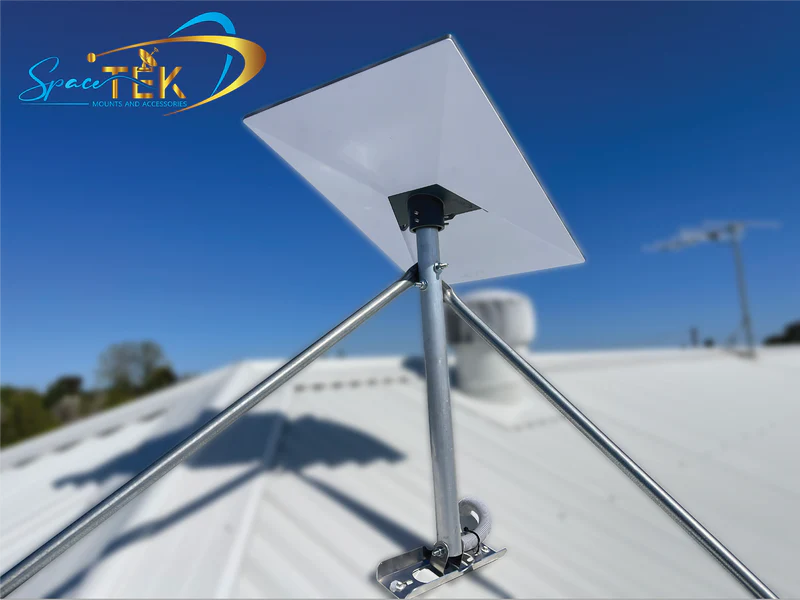
Why Choosing Between Starlink Performance Kits Matters

Starlink’s hardware names can be confusing. The product now identified by Starlink as Performance (Gen 2) was formerly called the Flat High Performance Kit. The newer Performance (Gen 3) is a separate business- and enterprise-oriented system. It should not be confused with the residential Standard Gen 3 kit, which is also commonly called Standard V4.
Key hardware differences at a glance:
- Intended use: Both Performance generations are designed for demanding permanent installations and supported mobility applications, subject to the service plan and installation requirements that apply to the intended use.
- Field of view: Both antennas have a published 140° field of view.
- Environmental rating: Performance (Gen 2) is rated IP56. Performance (Gen 3) is rated IP69K with its cables installed and IP68 without cables installed.
- Operating temperature: Performance (Gen 2) is specified for -22°F to 122°F (-30°C to 50°C); Performance (Gen 3) extends that range to -40°F to 140°F (-40°C to 60°C).
- Average power consumption: Starlink specifies 110–150 W for Performance (Gen 2) and 75–100 W for Performance (Gen 3). Actual consumption can vary with operating conditions, including snow-melt activity.
- Power input: The Gen 2 power supply uses 100–240 V AC input. The Gen 3 Advanced Power Supply supports 100–240 V AC or 12–56 V DC input.
- Orientation: Performance (Gen 2) is a fixed-orientation antenna. Performance (Gen 3) uses software-assisted manual orientation.
- Installation: The antenna, cable, power supply, and mounting interfaces differ, so an existing Gen 2 installation should not be assumed to accept Gen 3 hardware without changes.
The newer kit offers meaningful improvements in environmental sealing, temperature range, power use, and power-system flexibility. Those changes may matter for commercial sites, vehicles, vessels, remote facilities, and off-grid systems. They do not create a universal need to replace a working Performance (Gen 2) installation.
I’m Aaron Wroblewski, founder of SpaceTek, with more than 25 years of experience in remote communications and satellite systems. In this guide, I’ll explain what the published hardware differences mean when planning an installation or evaluating an upgrade.
If you are planning an installation, confirm the exact antenna model before selecting hardware. SpaceTek’s Starlink mounting kits cover several Starlink generations, but compatibility is product-specific rather than universal.
Starlink Performance Gen 2 vs Gen 3: Detailed Comparison
Model Names and Performance Expectations
Performance (Gen 2) is Starlink’s current name for the antenna previously sold as the Flat High Performance Kit. Performance (Gen 3) is the newer Performance Kit. Neither should be described simply as “the Gen 3 dish,” because that phrase is also widely used for the unrelated residential Standard Gen 3 hardware.
Both Performance antennas use an electronic phased array and provide a published 140° field of view. A broad field of view can give the system more usable sky than Standard-family hardware, but it does not make trees, buildings, rooflines, or other obstructions harmless. Use the Starlink app to check the proposed location and follow the setup instructions for the exact antenna.
Do not choose between the two kits using a promised download-speed figure alone. Starlink service performance varies with the service plan, location, network demand, obstructions, weather, installation, and other conditions. Starlink may publish plan-specific or product-specific maximums, but those figures are not guaranteed speeds at every site.
For a general overview of the network, see What Is Starlink Internet?
Environmental Ratings and Weather
Performance (Gen 2) carries an IP56 rating. Performance (Gen 3) carries a published IP69K rating when its cables are installed and IP68 when they are not installed. These ratings describe laboratory-tested resistance to defined dust and water exposure; they are not a guarantee against every flood, storm, saltwater, installation, connector, or maintenance scenario.
The published operating range increases from -22°F to 122°F (-30°C to 50°C) for Gen 2 to -40°F to 140°F (-40°C to 60°C) for Gen 3. Starlink also specifies snow-melt capability of up to 3 inches per hour (75 mm/h) for Gen 2 and up to 3.5 inches per hour (85 mm/h) for Gen 3. Snow-melt figures describe the antenna’s capability under suitable conditions and should not be treated as a promise that snow or ice can never accumulate.
Starlink publishes a survivable wind rating above 174 mph (280 km/h) for these fixed Performance antennas. This is a hardware specification, not a certification of the building, vehicle, vessel, mount, fasteners, or completed installation. The supporting structure and attachment method must be designed for the site, and exposed installations may require review by a qualified installer or engineer.
A corrosion-resistant mount, suitable fasteners, correctly seated connectors, cable strain relief, and a properly flashed roof penetration remain important. Do not rely on the antenna’s IP rating to compensate for an unsuitable mount or an unsealed building penetration.
Power and Cabling
Power requirements are one of the clearest practical differences. Starlink lists average consumption of 110–150 W for Performance (Gen 2) and 75–100 W for Performance (Gen 3). These are average ranges, not fixed loads. Allow suitable capacity for startup, operating variation, snow melt, conversion losses, networking equipment, and the requirements published for the complete kit.
Performance (Gen 2) uses a dedicated power supply with 100–240 V AC input. Performance (Gen 3) uses an Advanced Power Supply that accepts either 100–240 V AC or 12–56 V DC input. DC support can simplify some vehicle, marine, solar, or battery installations, but it does not mean the kit should be connected directly to any available circuit. Confirm voltage, current capacity, protection, grounding, cable size, connector requirements, and isolation with the Starlink documentation and a qualified installer.
The Gen 3 system also uses a different Starlink Performance cable and power architecture. Its cable is designed to be field-terminable with the specified connectors and procedure, which can help professional installers route and finish a cable for a particular site. Do not treat it as ordinary indoor Ethernet cable or substitute unapproved cable based only on connector appearance.
For cable-management and installation components, see the Starlink accessory range. Verify that each part is compatible with the exact Performance generation and installation environment.
Installation and Upgrade Compatibility
An upgrade is not normally a dish-only swap. Performance (Gen 3) has its own antenna dimensions, mounting choices, cable, and Advanced Power Supply. Existing Gen 2 mounts, cable runs, power supplies, and accessories may not fit or meet the requirements of the newer system.
Before ordering, record the current Starlink model, mount type, cable route, power source, router or firewall arrangement, service plan, and intended use. Then compare those details with the current Starlink kit contents and setup guide. Our guide to compatible Starlink mounts and adapters explains why the mounting interface must be matched to the hardware rather than selected by generation nickname alone.
For a roof, pole, vehicle, or vessel installation, check structural capacity, drainage, waterproofing, cable protection, grounding, electrical protection, clearance, and applicable codes. Use a qualified professional where the work involves structural attachments, roofing, mains power, vessel systems, or vehicle electrical systems.
Warranty terms can vary by product, region, seller, customer type, and current Starlink terms. Confirm the warranty shown for the equipment you are purchasing rather than relying on a generic generation comparison.
Is Performance Gen 3 Worth the Upgrade?
When Gen 3 May Be the Better Fit
Performance (Gen 3) is most compelling when one or more of its specific hardware changes solves a real installation requirement:
- Limited power: Its lower published average consumption can reduce the energy burden on a properly designed off-grid, vehicle, or vessel power system.
- Direct-current integration: The Advanced Power Supply’s 12–56 V DC input may simplify a professionally designed DC installation.
- Wider temperature exposure: Its published -40°F to 140°F operating range covers environments outside the Gen 2 specification.
- Greater ingress protection: Its published IP68/IP69K ratings may suit installations with demanding dust or water exposure when all cables, connectors, mounts, and installation details are handled correctly.
- New cable routes: The specified field-terminable cable system may assist a professional installation where conduit access or custom cable length is important.
Marine and in-motion use requires more than rugged hardware. Confirm that the antenna, mount, installation, country or waters of operation, and current Starlink service plan support the intended use. Hardware capability by itself does not authorize in-motion, offshore, or international service.
Starlink currently positions Performance (Gen 3) for Business and Enterprise customers in select regions, including North America. Availability within a broad region does not guarantee inventory, eligibility, pricing, or a particular plan at a specific US address. Check the options presented by Starlink for your account and service location before planning around the kit.
When Keeping Gen 2 Makes Sense
A working Performance (Gen 2) installation can remain a practical choice when it meets the site’s temperature and power requirements, has a clear view of the sky, uses an appropriate service plan, and is installed on a sound mount. Replacing it solely because a newer generation exists may add cable, power, mounting, labor, and service-planning costs without addressing the real cause of a connectivity problem.
If an existing system has interruptions, first review the Starlink app for obstructions, cable or hardware alerts, alignment guidance, and outage information. Also inspect the mount, connectors, power quality, cable route, router, and local network. Congestion, service-plan priority, Wi-Fi coverage, weather, and obstructions cannot necessarily be corrected by changing the antenna.
Final Recommendation
For a new demanding commercial, marine, vehicle, or remote installation, Performance (Gen 3) deserves consideration because it combines lower published average power consumption, AC/DC power input, a broader operating-temperature range, stronger published ingress protection, and a field-terminable cable system.
For an existing Performance (Gen 2) user, upgrade only when those differences solve a defined requirement or when Starlink identifies a hardware path appropriate for the account. There is no universal performance or reliability guarantee that makes Gen 3 an automatic replacement for every Gen 2 installation.
Whichever kit you choose, match the mount and accessories to the exact model, substrate, cable route, environmental exposure, and intended use. SpaceTek offers roof, pole, vehicle, and other Starlink mounting options, but each product’s compatibility and installation limits should be checked before purchase.
For help identifying an appropriate mount for your hardware, contact the SpaceTek team. For kit availability, service-plan eligibility, approved mobility use, current specifications, pricing, and warranty terms, confirm the details directly with Starlink before ordering or modifying an installation.

Leave a comment
This site is protected by hCaptcha and the hCaptcha Privacy Policy and Terms of Service apply.